고객 서비스

판매자들은 가입하면 더 많은 혜택을 누릴 수 있습니다.

모든 주문 무료 배송.

데스크톱 구성 요소

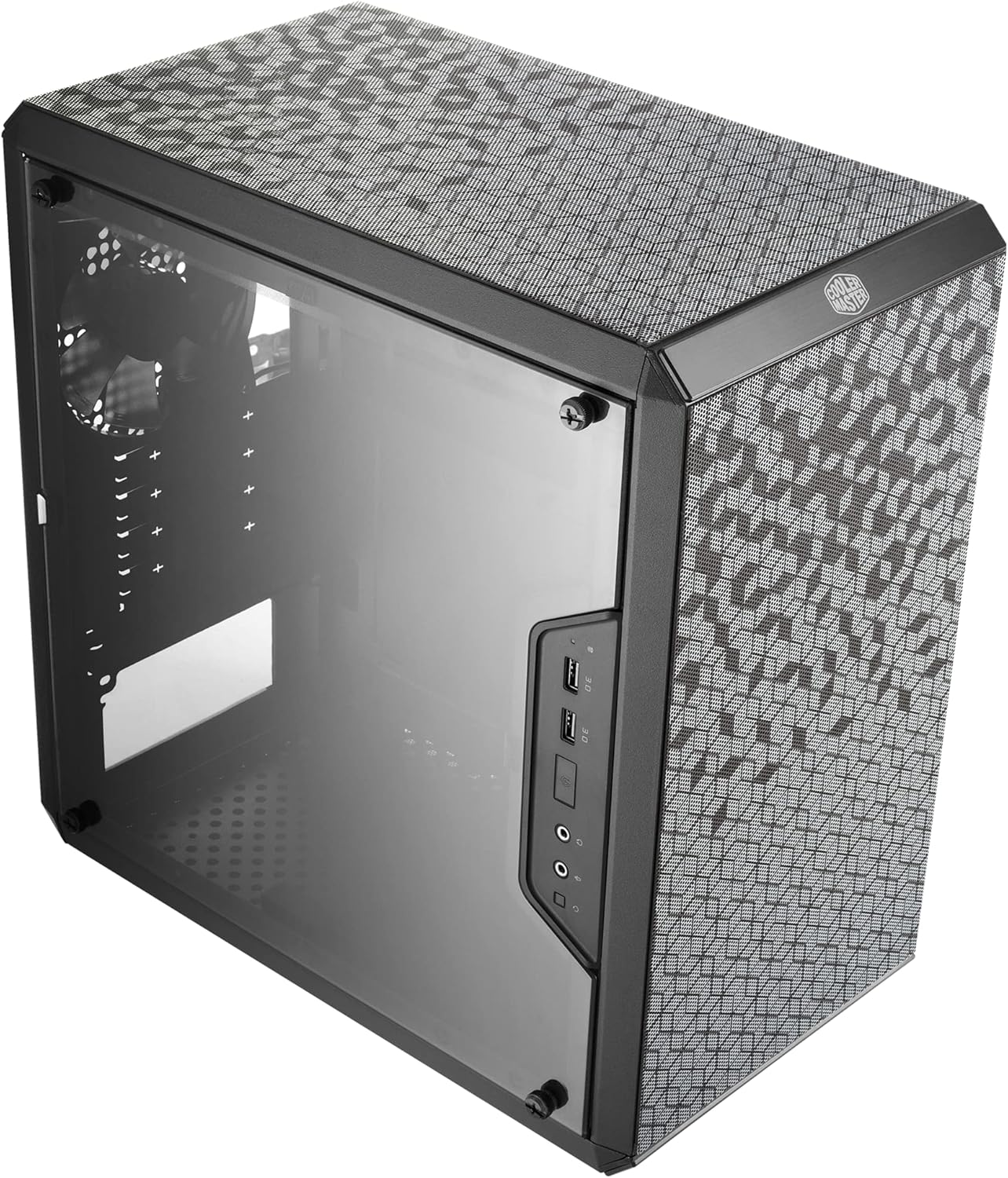
Cooler Master MasterBox Q300L Micro-ATX Tower with Magnetic Design Dust Filter, Transparent Acrylic Side Panel, Adjustable I/O & Fully Ventilated Airflow, Black (MCB-Q300L-KANN-S00)

4.50

지난 32시간 동안 판매됨 35

$ 39.99
$ 40.00
-0.03%

Great value micro-atx case. Its cheap and works. Like the compact size and the fact it came with screws, spacers, ties and a fan.I like the magnetic dust filters concept however BEWARE of the very rough and pointed edges which could cut you while handling them.The power button on the side panel worked for me but could be a problem with other builds. I was barely able to fit two Thermalright TL-C14C 140mm fans in the front with the default front facing power button+LED panel layout, while managing the power/led/usb cables in between the two fans to the backpanel but it was a very tight fit. You can move the power panel to top bottom or rear if you have the space. My Thermaltake Smart 700W PSU blocked the bottom though. While the top was blocked the height and size of the Thermalright Phantom Spirit 120 SE Black CPU Cooler. And the rear was blocked by case fan and no real access for cable management through to the back panel. So I had to make the front faced orientation to work, which it did.All in all I am happy with the value of the product.

15 현재 누군가가 웹사이트를 탐색 중입니다.

Style
Q300L
수량:
- +

예상 배송 시간: 12~26일(국제), 3~6일(미국)

구매일로부터 45일 이내에 반품이 가능합니다. 관세 및 세금은 환불되지 않습니다.

  • ASIN:

    B0785GRMPG

  • BEST_SELLERS_RANK:

    #3 in Computer Cases

  • BRAND:

    Cooler Master

  • COLOR:

    Black

  • CUSTOMER_REVIEWS:

    4.5 4.5 out of 5 stars (13,761) 4.5 out of 5 stars

  • DATE_FIRST_AVAILABLE:

    December 5, 2017

  • DEPARTMENT:

    Computer Cases

  • IS_DISCONTINUED_BY_MANUFACTURER:

    No

  • ITEM_DIMENSIONS_LXWXH:

    15.39 x 9.06 x 15 inches

  • ITEM_MODEL_NUMBER:

    MCB-Q300L-KANN-S00

  • ITEM_WEIGHT:

    1.06 pounds

  • MANUFACTURER:

    Cooler Master

  • NUMBER_OF_USB_3_0_PORTS:

    2

  • PRODUCT_DIMENSIONS:

    15.39 x 9.06 x 15 inches

  • SERIES:

    Q300L

  • WIRELESS_TYPE:

    802.11a

안전한 결제를 보장하세요

제품 상세 정보
The Master Box Q300L is your straightforward option in the lineup of the brand new Master Box Series from Cooler Master. A Series that might be small in size but excels in functionality and modularity without compromising on the thermal performance. Although the size wouldn't tell, the Master Box Q300L supports a standard ATX PSU which we don't see often in the market with this size. Based on the different system setup, the I/O panel can be adjusted to six different locations, three options at each side of the case. You can decide which setup fits your system best. Due to the cube design of the frame and special pattern design on the magnetic dust filter will make the chassis stand out from the rest. The combination of a practical design and the unique customizable outlook makes the Master Box Q300L The perfect choice for office and home.
고객 리뷰
4.50

(100 점수)

5
3
4
2
3
7
2
17
1
71
댓글 취소
댓글을 남겨주세요

18 논평

Echte aanrader
2026-02-24    -Daniël

Goede kast met aardig wat mogelijkheden! Had zelf een kast nodig die niet te veel ruimte innam en niet al te duur was. Ik ben positief verrast.

I love this case. I hate this case. Such wonderful and hateful things to say about the same case. Lets review.The good: This case is pretty. I love the aesthetics of this case. It's also very compact. It looks like a midget compared to my old Coolermaster HAF 900 series case. That's nice, since I get a lot more room on my desk, and I can position this tower in places I couldn't fit my old one. It's allowed me to do some really cool things with my desk setup that I couldn't do before. The dust covers are pretty, and they make it much easier to clean the case more frequently. (You'll still need deep cleaning every once and a while.)The bad: Boy oh boy does it suck to install things in this case. Like, cable routing is a FREAKING NIGHTMARE. If you don't care about that stuff, then it's still going to suck working in this case. "Cheap crap" is a nice description of everything about this case. The window? Cheap plexiglass that scratches easily. The PCI-E holes at the back of the case require you to pull them off using excessive force, potentially risking bending the thin metal between the slots. I ended up bending the back PCI-E screw pannel by overtightening the screws. Airflow? Gamer's Nexus tested the Q500L version of the case, and it was literally the worst case they ever tested for air flow. It caused components to thermal throttle (read: slow your computer down) at even low workloads. The Q300L is better, but it's still not winning any competitions. NEVER buy the Q500L.That seems like a long list of negatives, and it is. But I haven't gotten to the worst sin this case commits: Cable routing. I'm sure this is better than some other cases out there, but it's still pretty bad. Let's enumerate the problems you'll likely run into when routing cables: The movable button panel doesn't stretch long enough to route in convenient locations. The only place to run cables to the top of the case is a small hole that doesn't fit a standard power connector without causing you crazy amounts of grief and bending the plastic connectors while tearing chunks of flesh off your finger as you pull it through. There's not enough room on the back of the case to run your standard SATA cables for SSDs, and installing front fans means you lose out on a lot of potential cabling options. (You HAVE to move the button panel to the bottom/top if you use front fans)Why did I get this? I couldn't find a reasonably priced small sized case to put a Threadripper build in. I could have sprung for one of the smaller cases designed for compact builds, but each one of them had a deal-breaking problem. (Out of stock, couldn't fit micro-atx mobo, costs like 400$, etc.) I knew what I'd suffer through to get all the hardware to fit inside this case, while running custom cables for aesthetics. I consider it a worthwhile purchase. I spent several extra hours building this when compared with a case that was well designed. I ran into like 20 different configurations where things barely didn't fit by a millimeter or less, and the current configuration fits because I spent like 3 extra hours cabling this monster. But it was cheap, pretty, and small, so I'd probably do it again. Probably not the right case for you.Overall: This is a cheap case. It's an affordable place to put your computer. Don't expect much more than that. You can spend like 20$ more to get something truly worth holding your components.

So first I'd like to state that this review is specifically for the Q300L model. Amazon does this annoying thing where they mix all the reviews of all the models together and I can't stand it so I'm just stating the model flat out.I just built my 10 year old nephew’s PC using this case and I have to say that I was very surprised at how much I loved building in this case. Originally I bought the Compucase HEC HX300 case for 30$ from Newegg and I was just frustrated at the lack of air flow from that case. It only had room for one fan which was the back exhaust and that's it. It didn't even have holes for the power supply's intake fan! It was my fault for not researching enough and buying something so cheap. Then I did a little research and came across this case. It is only 50$ but has everything I want. I've seen PC builders on youtube build with this case and they all had great things to say.So the first thing I like about this case is obviously how much airflow it allows. It's an interesting design because there are holes all over the top, all over the bottom, and all over the front and you can install 4 fans if you wanted to (2 up top, 2 in front, 2 in bottom) in addition to the included exhaust fan at the back making it support up to 5 fans! Now with all those holes you might be thinking this is going to be an ugly case but as you'll see in the pictures this is not the case (pun intended) and it has very sleek looking dust filters to cover the top, front, and it’s not obvious from the picture but it has a filter on the bottom as well. I was pleasantly surprised to see that the filter is magnetic which made removing them to install my fans a breeze (pun intended). I also imagine cleaning them when they get dirty will also be very simple. You can simple remove them and just rinse with water. One tip when installing fans is that since there’s air holes all over, they actually made a very small indentation around the holes that you should screw in your fans. These “guides” are hard to notice but if you look closely you’ll see them. They have space for 140mm and 120mm fans depending on whatever you want. Air is able to easily flow through the filter so my air flow issues were resolved!The case also looks very nice in my opinion. I have the black model just because that’s what my nephew wanted but in review videos I’ve seen, the white one looks very nice as well. Cable management at the back is pretty good too and the case comes with a lot of zip ties. The filters I mention above are also very aesthetically pleasing. The power button, 2 USB ports, headphone jack, and speaker jack are on the side which I don’t mind. The interesting thing is that this IO panel can be unscrewed and moved to the other side which is nice. The clear side panel is acrylic but it’s a 50$ case so it’s fine. It doesn’t look bad at all. There’s also room in the cable management area for a 3.5” hard drive and 2 SSD’s inside the main area which is very good.Overall the case was pretty simple to build in. It’s designed very well to maximize airflow while looking great. I think this is an excellent case especially for the price. If you’re in the market for a cheap but good PC case, then you my friends have stumbled on a cheap but GREAT PC case. I would highly recommend this case and am willing to do even more expensive builds with this case in the future.One final note I’ll add, I built my nephew’s pc with a Ryzen 5 1600 processor and RX 480 gpu reference model targeting 1080p gaming and the heat in my old case with that one exhaust fan was reaching around 87 degrees C. After I added two intake fans in the front and one exhaust fan in the top along with the back exhaust fan that comes with this case my temperatures went down into the mid 70’s while gaming which is great. If you want looks as well as functionality for a great price, go with this case.

1) Cable management that does not suck, that's a big advantage2) Can be placed under the monitor on the desktop, rubber pieces on the long side3) With 3 PWM-driven chassis coolers it is a silent beauty4) Overclocked graphics card temperature is below 65°, that's very nice airflow5) The side panel is acrylic, not glass, which is so so, but pretty fine for a budget setup6) Buttons and USBs can be rebased at any side, but I just kept them as-is7) Very careful and lovely use manual, showing all necessary addons for different setups8) Loved the included rubber pieces for easy placing of the SSDsWould definitely recommend it!

Echte aanrader
2026-01-20    -Daniël

Goede kast met aardig wat mogelijkheden! Had zelf een kast nodig die niet te veel ruimte innam en niet al te duur was. Ik ben positief verrast.

Great value micro-atx case. Its cheap and works. Like the compact size and the fact it came with screws, spacers, ties and a fan.I like the magnetic dust filters concept however BEWARE of the very rough and pointed edges which could cut you while handling them.The power button on the side panel worked for me but could be a problem with other builds. I was barely able to fit two Thermalright TL-C14C 140mm fans in the front with the default front facing power button+LED panel layout, while managing the power/led/usb cables in between the two fans to the backpanel but it was a very tight fit. You can move the power panel to top bottom or rear if you have the space. My Thermaltake Smart 700W PSU blocked the bottom though. While the top was blocked the height and size of the Thermalright Phantom Spirit 120 SE Black CPU Cooler. And the rear was blocked by case fan and no real access for cable management through to the back panel. So I had to make the front faced orientation to work, which it did.All in all I am happy with the value of the product.

So first I'd like to state that this review is specifically for the Q300L model. Amazon does this annoying thing where they mix all the reviews of all the models together and I can't stand it so I'm just stating the model flat out.I just built my 10 year old nephew’s PC using this case and I have to say that I was very surprised at how much I loved building in this case. Originally I bought the Compucase HEC HX300 case for 30$ from Newegg and I was just frustrated at the lack of air flow from that case. It only had room for one fan which was the back exhaust and that's it. It didn't even have holes for the power supply's intake fan! It was my fault for not researching enough and buying something so cheap. Then I did a little research and came across this case. It is only 50$ but has everything I want. I've seen PC builders on youtube build with this case and they all had great things to say.So the first thing I like about this case is obviously how much airflow it allows. It's an interesting design because there are holes all over the top, all over the bottom, and all over the front and you can install 4 fans if you wanted to (2 up top, 2 in front, 2 in bottom) in addition to the included exhaust fan at the back making it support up to 5 fans! Now with all those holes you might be thinking this is going to be an ugly case but as you'll see in the pictures this is not the case (pun intended) and it has very sleek looking dust filters to cover the top, front, and it’s not obvious from the picture but it has a filter on the bottom as well. I was pleasantly surprised to see that the filter is magnetic which made removing them to install my fans a breeze (pun intended). I also imagine cleaning them when they get dirty will also be very simple. You can simple remove them and just rinse with water. One tip when installing fans is that since there’s air holes all over, they actually made a very small indentation around the holes that you should screw in your fans. These “guides” are hard to notice but if you look closely you’ll see them. They have space for 140mm and 120mm fans depending on whatever you want. Air is able to easily flow through the filter so my air flow issues were resolved!The case also looks very nice in my opinion. I have the black model just because that’s what my nephew wanted but in review videos I’ve seen, the white one looks very nice as well. Cable management at the back is pretty good too and the case comes with a lot of zip ties. The filters I mention above are also very aesthetically pleasing. The power button, 2 USB ports, headphone jack, and speaker jack are on the side which I don’t mind. The interesting thing is that this IO panel can be unscrewed and moved to the other side which is nice. The clear side panel is acrylic but it’s a 50$ case so it’s fine. It doesn’t look bad at all. There’s also room in the cable management area for a 3.5” hard drive and 2 SSD’s inside the main area which is very good.Overall the case was pretty simple to build in. It’s designed very well to maximize airflow while looking great. I think this is an excellent case especially for the price. If you’re in the market for a cheap but good PC case, then you my friends have stumbled on a cheap but GREAT PC case. I would highly recommend this case and am willing to do even more expensive builds with this case in the future.One final note I’ll add, I built my nephew’s pc with a Ryzen 5 1600 processor and RX 480 gpu reference model targeting 1080p gaming and the heat in my old case with that one exhaust fan was reaching around 87 degrees C. After I added two intake fans in the front and one exhaust fan in the top along with the back exhaust fan that comes with this case my temperatures went down into the mid 70’s while gaming which is great. If you want looks as well as functionality for a great price, go with this case.

Good Case with many options
2026-02-03    -Praf3l

The media could not be loaded. So this q300l case was released by cooler master in 2018This Case was q500l 2019-2020 predecessorThis case has holes in top, front and bottomI had 5 fan laptop cooler on which this Case is sitting right now, my laptop had fan issues so now it's used for PC case coolingI have attached 2 arctic fans 140mm 1600rpm and 120mm ,1200rpm in front for intake2 coolermaster fans one for exhaust (xtraflow 1500rpm) backcand one for top ( 200-1000 rpm)1 circle fan (1000-1200) rpmMy PC temp with just one exhaust fan was around 45-55 during normal usage and CPU temp was around 64-74 degrees on normal to heavy load and gpu temps were 50 - 60 degreesCPU fan was spinning at 1500 rpm maxAfter bumping up AMD wraith Cooler fan to max fan speed of 2600 rpm in bios settings, my CPU temps went down to 50 degrees.After installing all the fans,My case temps are 36-39 degreesMy CPU temp is at 42 degrees normal and at 57 on load.If your buying this case get at least 2-4 fansYou can 140mm fans or radiator in the front onlyOn top only 120mm can be attached properlyI could be wrong depends on brand and size of 140mm fanMy arctic fan screw holes weren't able to match on top of the case.The magnetic dust filter on top and front can be cleaned easily.The side panel is acrylic, fingerprint magnet.2 USB 3.0 jacks in frontMic and headphones Jack with HD audio but can only do 5.1 channel not 7.1.I had to attach my 7.1 channel headphone in the backCable management very goodLot of spaces in the back.If you have radiator then your CPU temps will get better than mine .This case should cost around 3500 rupeesBut I had no choice but pay up 4500 rupeesCuz it I needed it urgently.This pandemic has really screwed PC enthusiast when it comes to pricing of PC components.4/5My PC specsAMD 1300X 3.8ghz (2018)Sapphire pulse RX580 8gb OC lite (2020) 😑Ballistix red 16gb (2020)😑Cooler master 550 mwe psu (2018)Acer vgo monitor 144hzLG monitor 75hz

1) Cable management that does not suck, that's a big advantage2) Can be placed under the monitor on the desktop, rubber pieces on the long side3) With 3 PWM-driven chassis coolers it is a silent beauty4) Overclocked graphics card temperature is below 65°, that's very nice airflow5) The side panel is acrylic, not glass, which is so so, but pretty fine for a budget setup6) Buttons and USBs can be rebased at any side, but I just kept them as-is7) Very careful and lovely use manual, showing all necessary addons for different setups8) Loved the included rubber pieces for easy placing of the SSDsWould definitely recommend it!

5.0 out of 5 stars I am Pleased
2026-02-01    -Kyle Jarvis

awesome case great airflow and space the only thing is space for hdd or ssd you will have to make it work if you want a clean looking case and i wish this case had a cover for the psu but all in all i love the case and the airflow of this case definitely worth the money very solid built

댓글을 남겨주세요:

댓글 제목
댓글 내용
배송 및 반품
우리가 당신을 보호하겠습니다

대부분 지역에서는 배송비를 한 번만 지불하시면 됩니다 (주문 및 배송 페이지를 확인해 주세요).

구매 후 14일 이내 무료 반품 가능 (단, 수명이 다한 제품, 맞춤 제작 상품, 마스크, 향수 및 에어로졸과 같이 위험하거나 인화성 물질이 포함된 일부 제품은 제외).

수입 관세 정보

복잡한 절차는 저희가 처리해 드리겠습니다. 카나리아 제도를 제외한 모든 EU 국가, 영국, 미국, 캐나다, 호주, 뉴질랜드, 푸에르토리코, 스위스, 싱가포르, 한국, 쿠웨이트, 멕시코, 카타르, 인도, 노르웨이, 사우디아라비아, 대만, 태국, UAE, 일본, 브라질, 맨섬, 산마리노, 콜롬비아, 칠레, 아르헨티나, 이집트, 레바논, 홍콩 특별행정구, 바레인, 터키로 배송되는 상품 가격에는 모든 수입 관세가 포함되어 있습니다. 표시된 가격이 최종 결제 금액입니다.

예상 배송 시간

특급 배송: 7-10일

해당 창고에서 배송되었습니다.

더 자세한 정보가 필요하신가요?
반품 정책
반품 정책

저희는 제품 품질에 자신 있습니다. 만약 구매하신 제품에 완전히 만족하지 못하신다면, 수령일로부터 30일 이내에 간편하게 반품하실 수 있도록 정책을 마련해 두었습니다.

간편한 교환 또는 환불
  • 다른 사이즈, 색상 또는 스타일의 상품으로 교환하거나 전액 환불받을 수 있습니다.
  • 반품되는 모든 상품은 착용하지 않은 상태여야 하며, 원래 포장 상태 그대로 모든 태그가 손상되지 않은 상태여야 합니다.
간단한 절차
  • 온라인으로 반품을 신청하거나 고객 서비스 팀에 문의하여 도움을 받으실 수 있습니다.
  • 물품을 제대로 포장해 주시고, 원래의 포장 목록도 함께 넣어주세요.
  • 반품하실 상품을 보내주실 때에는 저희가 제공해 드린 선불 배송 라벨을 사용해 주시기 바랍니다.
  • 환불 요청 접수 즉시 처리해 드리겠습니다.

반품과 관련하여 궁금한 점이나 우려 사항이 있으시면 언제든지 저희 전문 고객 서비스 팀에 문의해 주세요. 고객 만족은 저희의 최우선 목표입니다.

범주
차이
제품
모든 제품 지우기