고객 서비스

판매자들은 가입하면 더 많은 혜택을 누릴 수 있습니다.

모든 주문 무료 배송.

미니

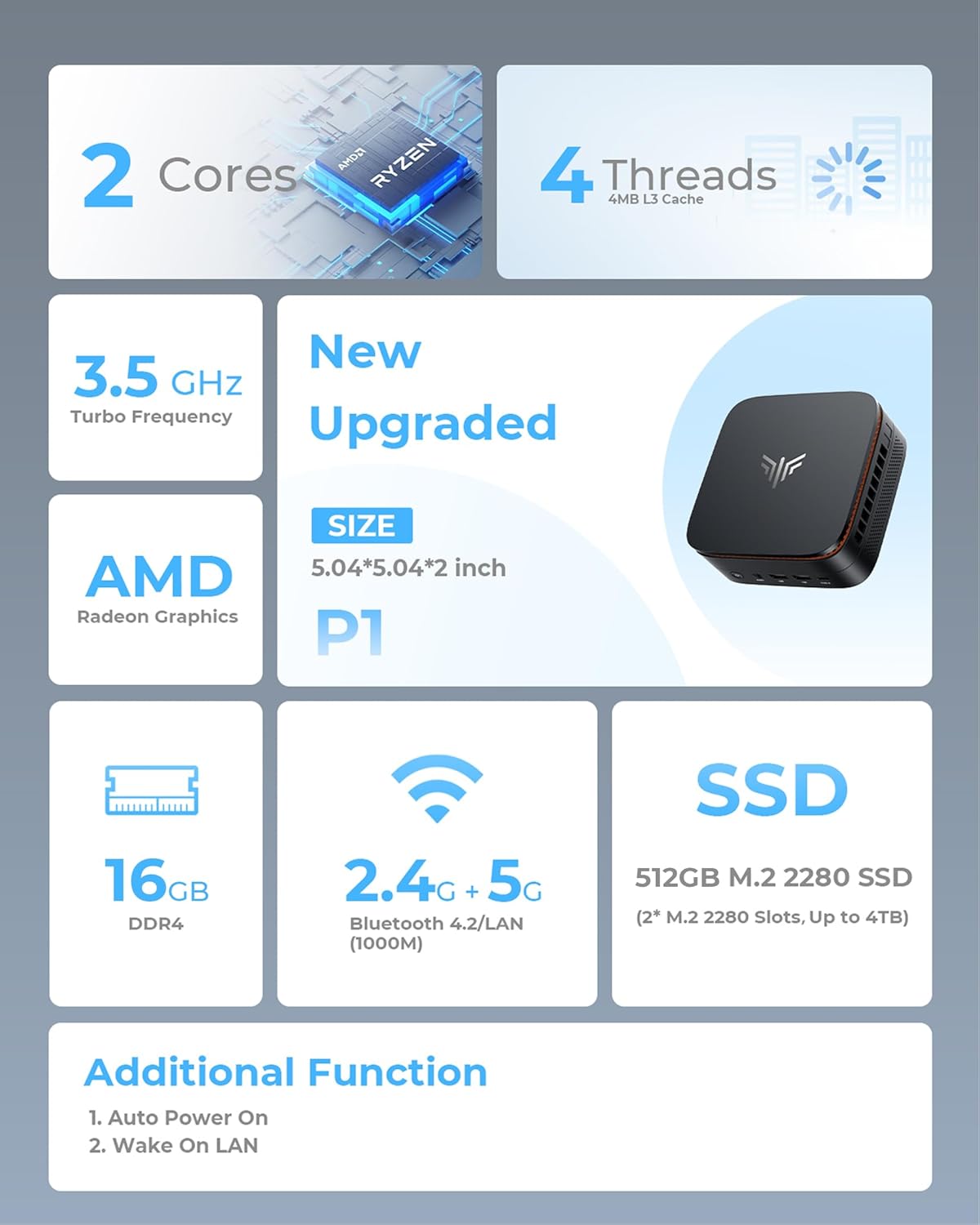
KAMRUI Pinova P1 Mini PC, AMD Ryzen 3250U (up to 3.5GHz), 16GB DDR4 RAM 512GB M.2 SSD, Mini Desktop Computer Support Triple 4K, WiFi, Ethernet for Business, Office, Home

4.50

지난 32시간 동안 판매됨 42

$ 239.99
$ 257.00
-7.09%

I was looking for a second PC to run two twitch streams (DashDucks and OurChickenLife) to take the load off of my actual gaming laptop and possibly some light gaming. My initial reaction was this is surprisingly fast for a sub $125 mini PC. It is snappy and loads chrome and the two twitch streams just fine with each stream in a separate window (one on each monitor). I was super happy with finally having the ability to have a PC with dual monitors and at this price point is in incredible.Set up was easy and I was up and running in under 5 minutes. Boot time is under 20 seconds and once I configured it for not needing to login even faster than that. I initially installed Steam, Discord, Chrome, SpeedTest (from the Microsoft store), and an auto clicker mouse program. I ended up deleting Steam and Discord as the game I primarily play struggled even on very low graphics settings. The game in question is Farm Together 2 and would highly recommend if you like farming games. Anyways, it wasn't unbearable but there was noticeable lag when moving around in the game. Discord ran ultra smooth though and there wasn't any lag so would be great for using that on this PC.As for internet speeds and quality goes, I would very HIGHLY recommend using an ethernet cable if you can. My current internet speed is 1.0 GB up and down. Under WiFi, I got a 1/5th of that speed with speeds around 200 down and 150 up despite this PC being literally inches from the router. This is most likely a limit of the WiFi 5 used in this PC and not necessarily a defect. Once I installed a Cat 6 ethernet cable, I got around my full speed of 930 both up and down. While it was on WiFi, I didn't notice any lag when watching the twitch streams When installing windows updates though, definitely use an ethernet cable.As for noise level this thing is ultra quiet even under 100% CPU usage. Always was cool to the touch when I checked and no burning or any kind of smells like that since I have been using it. I keep it running 24/7 and as of the writing of this review it has been flawless.As for storage and RAM this seems to be good to go right out of the gate. You do have the option to upgrade if you wish, but for my needs the 8GB of RAM is just fine. It hits around 60% usage for RAM with running 2 chrome windows. And for storage with only chrome, speedtest, my mouse program, and edge which was preinstalled storage is very sufficient for me. And you can also upgrade the hard drive (SSD) to 2TB so if in the future I need more space or change how I use this PC I can. And honestly, that is a comforting thought knowing the option is available to me. If you are considering one of the larger storage models I would say go for it versus this 256GB version as it won't be an issue later on, but for me I got this version initially because of budget reasons and it would work for me and my needs. My game would probably run alot better if it had the 16GB of RAM but I am okay with just using it as a media consumption PC.Not having to worry about batteries and all that jazz was a huge selling point for me versus getting, say a Chromebook. I have this plugged into my battery backup in the event of a power failure which alleviates my worries a bit.My only real complaint with this PC is the placement of the power button. I did accidentally press it causing the PC to go to sleep when connecting my mouse and keyboard, but this can be changed in settings as to what the power button does in settings. I do wish it was in the front, but it isn't anything deal breaking.Overall, this is a great little PC for what I needed it for, which was to run 2 twitch streams via chrome. Your mileage may vary, but I feel confident recommending this PC for light to medium use. I don't do video editing or any intense operations like that so I can't comment on that. USB connections have been stable (no random disconnects) and the HDMI ports have both been running great. It runs Windows 11 just fine and aside from some user stumbles on figuring out where things are now and then (coming from Windows 10) it is just fine.I hope this review has helped you and have a blessed day <3

29 현재 누군가가 웹사이트를 탐색 중입니다.

Size
Intel N95/8GB+256GB 16GB+256GB/N97 16GB+1TB/3500U
Style
E1 N95 E1 N97 E3 3500U
수량:
- +

예상 배송 시간: 12~26일(국제), 3~6일(미국)

구매일로부터 45일 이내에 반품이 가능합니다. 관세 및 세금은 환불되지 않습니다.

  • ASIN:

    B0DZ1VL4JJ

  • BEST_SELLERS_RANK:

    #2,769 in Computers & Accessories (See Top 100 in Computers & Accessories) #110 in Mini Computers

  • BRAND:

    KAMRUI

  • CARD_DESCRIPTION:

    Integrated

  • CHIPSET_BRAND:

    /

  • COMPUTER_MEMORY_TYPE:

    DDR4 SDRAM

  • CUSTOMER_REVIEWS:

    4.5 4.5 out of 5 stars (214) 4.5 out of 5 stars

  • DATE_FIRST_AVAILABLE:

    March 3, 2025

  • FLASH_MEMORY_SIZE:

    8 GB

  • GRAPHICS_CARD_RAM_SIZE:

    16 GB

  • GRAPHICS_COPROCESSOR:

    AMD Radeon Graphics

  • HARD_DRIVE:

    256 SSD

  • HARD_DRIVE_INTERFACE:

    Serial ATA

  • ITEM_DIMENSIONS_LXWXH:

    5.04 x 5.04 x 2.05 inches

  • ITEM_MODEL_NUMBER:

    P1

  • ITEM_WEIGHT:

    1.79 pounds

  • MAX_SCREEN_RESOLUTION:

    3840x2160 Pixels

  • MEMORY_SPEED:

    3.5 GHz

  • NUMBER_OF_PROCESSORS:

    4

  • NUMBER_OF_USB_2_0_PORTS:

    4

  • NUMBER_OF_USB_3_0_PORTS:

    2

  • OPERATING_SYSTEM:

    OS

  • PROCESSOR:

    2.6 GHz ryzen_3_3250u

  • PROCESSOR_BRAND:

    /

  • PRODUCT_DIMENSIONS:

    5.04 x 5.04 x 2.05 inches

  • RAM:

    DDR4

  • SCREEN_RESOLUTION:

    3840 x 2160

  • SERIES:

    P1

  • WIRELESS_TYPE:

    2.4 GHz Radio Frequency, 5 GHz Radio Frequency, 802.11ac

안전한 결제를 보장하세요

제품 상세 정보
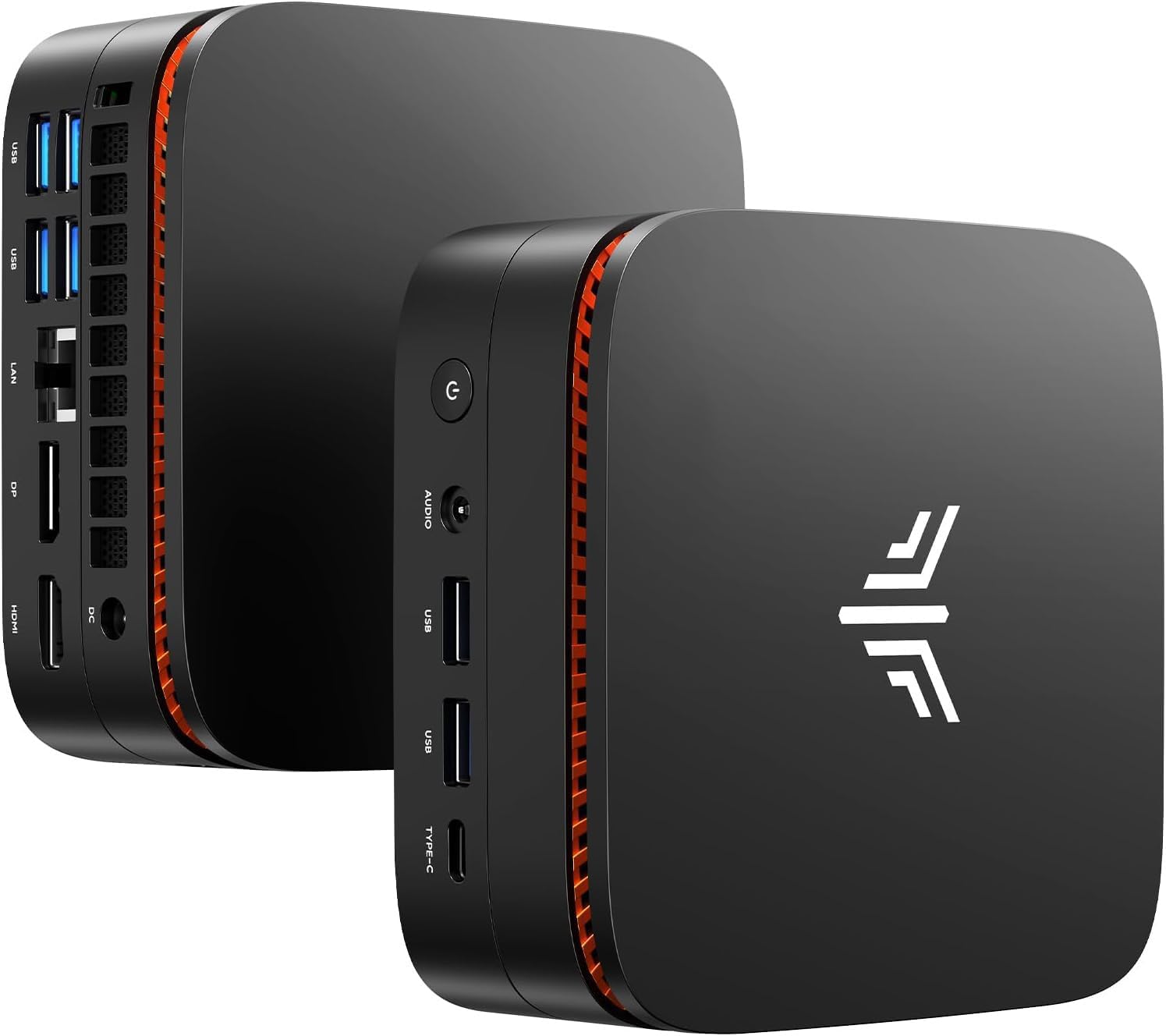
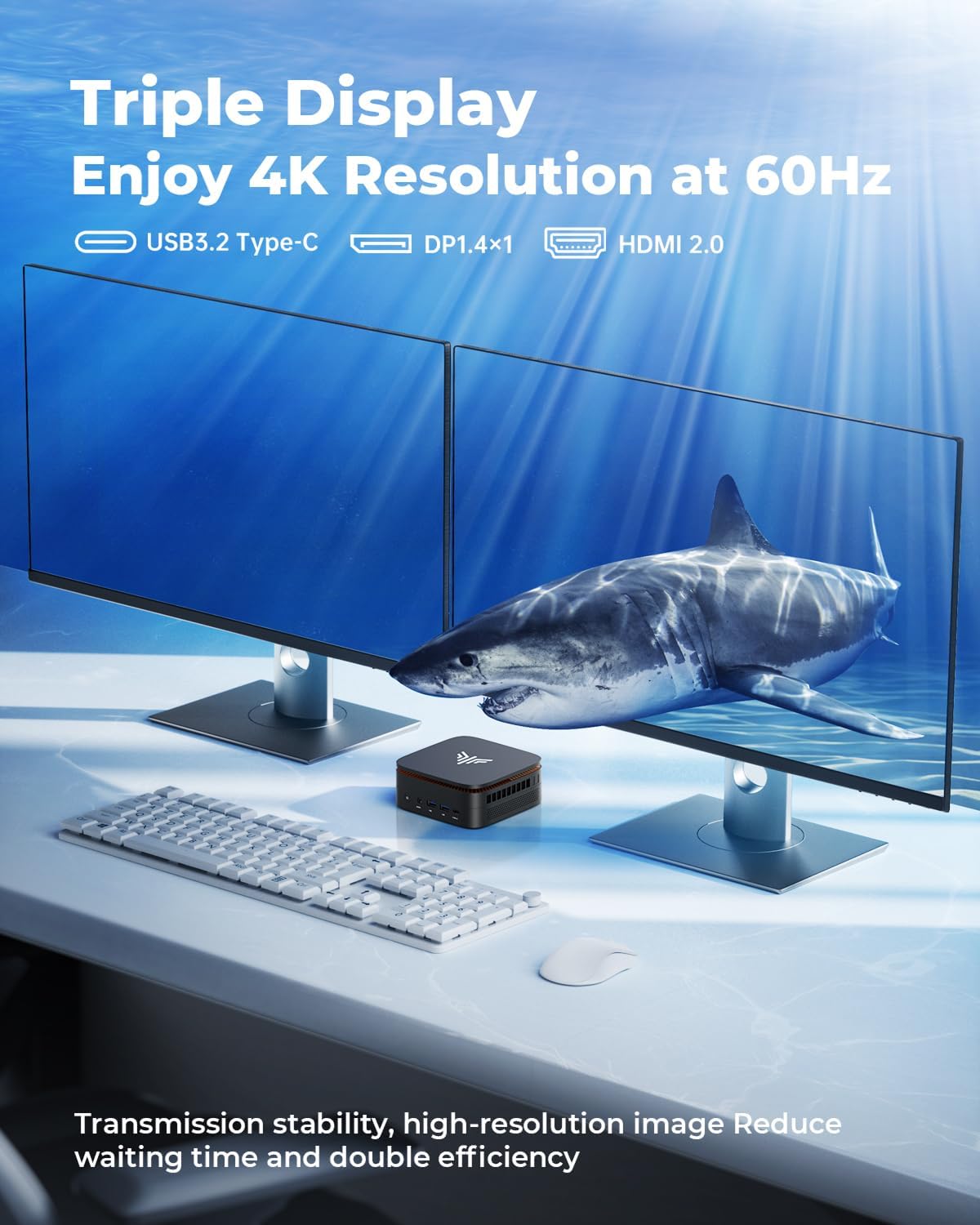
Choose KAMRUl, Choose Professional Mini PC KAMRUI are an integrated high-tech enterprise of computer technology committed to R&D, production, and sales of smart products like Mini PC, and pc stick. KAMRUI Mini PCs blend a stylish design, high-performance professional features and an incredible end-user experience for , and so on. If you're needing a small PC for , , or even an , , KAMRUI Pinova P1 would be your right choice! , this is a that has enough power to , all at the same time KAMRUI mini computer tower has interfaces and interfaces. The transmission of USB 3.0 is faster than that of USB 2.0, so it's easy for you to transfer , even the in a short time, thus reduce the energy consumption Only 5.04 x 5.04 x 2.05-inch dimensions and 0.84 lbs. So mini sized so that you can put it in a bag or briefcase. It’s a sleek alternative to a traditional tower PC. Today, you can get a powerful desktop PC the size of a peanut butter sandwich. Whether you're trying to , fit more computers into your , or squeeze a into your , there's an Pinova mini desktop computer made for you Are you not sure which mini pc is better for your office? No worries! KAMRUI Pinova P1 small form factor pc for business home office would be your the one best! We have and a good , coupled with and . We can ensure that each one of you receive high-quality products
고객 리뷰
4.50

(100 점수)

5
7
4
1
3
3
2
11
1
78
댓글 취소
댓글을 남겨주세요

12 논평

I would 100% recommend. Bought 5 for Cellphone stores for POS work, browsing and it works perfect... during break i get to game a little through game pass ultimate, or watch shows on streaming platforms. The mini PC everyone should have. Turns on in a few seconds and saves energy, super slick minimalistic design if used with wireless peripherals. Faster than most $500 all in ones and well optimized for windows 11 since its 12gb ram. Super fast internet if connected through LAN. Great value purchase and it saves you money. Also extra bottom compartment for extra storage which is cool and not sure why its not on the description.

I would 100% recommend. Bought 5 for Cellphone stores for POS work, browsing and it works perfect... during break i get to game a little through game pass ultimate, or watch shows on streaming platforms. The mini PC everyone should have. Turns on in a few seconds and saves energy, super slick minimalistic design if used with wireless peripherals. Faster than most $500 all in ones and well optimized for windows 11 since its 12gb ram. Super fast internet if connected through LAN. Great value purchase and it saves you money. Also extra bottom compartment for extra storage which is cool and not sure why its not on the description.

I was looking for a second PC to run two twitch streams (DashDucks and OurChickenLife) to take the load off of my actual gaming laptop and possibly some light gaming. My initial reaction was this is surprisingly fast for a sub $125 mini PC. It is snappy and loads chrome and the two twitch streams just fine with each stream in a separate window (one on each monitor). I was super happy with finally having the ability to have a PC with dual monitors and at this price point is in incredible.Set up was easy and I was up and running in under 5 minutes. Boot time is under 20 seconds and once I configured it for not needing to login even faster than that. I initially installed Steam, Discord, Chrome, SpeedTest (from the Microsoft store), and an auto clicker mouse program. I ended up deleting Steam and Discord as the game I primarily play struggled even on very low graphics settings. The game in question is Farm Together 2 and would highly recommend if you like farming games. Anyways, it wasn't unbearable but there was noticeable lag when moving around in the game. Discord ran ultra smooth though and there wasn't any lag so would be great for using that on this PC.As for internet speeds and quality goes, I would very HIGHLY recommend using an ethernet cable if you can. My current internet speed is 1.0 GB up and down. Under WiFi, I got a 1/5th of that speed with speeds around 200 down and 150 up despite this PC being literally inches from the router. This is most likely a limit of the WiFi 5 used in this PC and not necessarily a defect. Once I installed a Cat 6 ethernet cable, I got around my full speed of 930 both up and down. While it was on WiFi, I didn't notice any lag when watching the twitch streams When installing windows updates though, definitely use an ethernet cable.As for noise level this thing is ultra quiet even under 100% CPU usage. Always was cool to the touch when I checked and no burning or any kind of smells like that since I have been using it. I keep it running 24/7 and as of the writing of this review it has been flawless.As for storage and RAM this seems to be good to go right out of the gate. You do have the option to upgrade if you wish, but for my needs the 8GB of RAM is just fine. It hits around 60% usage for RAM with running 2 chrome windows. And for storage with only chrome, speedtest, my mouse program, and edge which was preinstalled storage is very sufficient for me. And you can also upgrade the hard drive (SSD) to 2TB so if in the future I need more space or change how I use this PC I can. And honestly, that is a comforting thought knowing the option is available to me. If you are considering one of the larger storage models I would say go for it versus this 256GB version as it won't be an issue later on, but for me I got this version initially because of budget reasons and it would work for me and my needs. My game would probably run alot better if it had the 16GB of RAM but I am okay with just using it as a media consumption PC.Not having to worry about batteries and all that jazz was a huge selling point for me versus getting, say a Chromebook. I have this plugged into my battery backup in the event of a power failure which alleviates my worries a bit.My only real complaint with this PC is the placement of the power button. I did accidentally press it causing the PC to go to sleep when connecting my mouse and keyboard, but this can be changed in settings as to what the power button does in settings. I do wish it was in the front, but it isn't anything deal breaking.Overall, this is a great little PC for what I needed it for, which was to run 2 twitch streams via chrome. Your mileage may vary, but I feel confident recommending this PC for light to medium use. I don't do video editing or any intense operations like that so I can't comment on that. USB connections have been stable (no random disconnects) and the HDMI ports have both been running great. It runs Windows 11 just fine and aside from some user stumbles on figuring out where things are now and then (coming from Windows 10) it is just fine.I hope this review has helped you and have a blessed day <3

I was looking for a second PC to run two twitch streams (DashDucks and OurChickenLife) to take the load off of my actual gaming laptop and possibly some light gaming. My initial reaction was this is surprisingly fast for a sub $125 mini PC. It is snappy and loads chrome and the two twitch streams just fine with each stream in a separate window (one on each monitor). I was super happy with finally having the ability to have a PC with dual monitors and at this price point is in incredible.Set up was easy and I was up and running in under 5 minutes. Boot time is under 20 seconds and once I configured it for not needing to login even faster than that. I initially installed Steam, Discord, Chrome, SpeedTest (from the Microsoft store), and an auto clicker mouse program. I ended up deleting Steam and Discord as the game I primarily play struggled even on very low graphics settings. The game in question is Farm Together 2 and would highly recommend if you like farming games. Anyways, it wasn't unbearable but there was noticeable lag when moving around in the game. Discord ran ultra smooth though and there wasn't any lag so would be great for using that on this PC.As for internet speeds and quality goes, I would very HIGHLY recommend using an ethernet cable if you can. My current internet speed is 1.0 GB up and down. Under WiFi, I got a 1/5th of that speed with speeds around 200 down and 150 up despite this PC being literally inches from the router. This is most likely a limit of the WiFi 5 used in this PC and not necessarily a defect. Once I installed a Cat 6 ethernet cable, I got around my full speed of 930 both up and down. While it was on WiFi, I didn't notice any lag when watching the twitch streams When installing windows updates though, definitely use an ethernet cable.As for noise level this thing is ultra quiet even under 100% CPU usage. Always was cool to the touch when I checked and no burning or any kind of smells like that since I have been using it. I keep it running 24/7 and as of the writing of this review it has been flawless.As for storage and RAM this seems to be good to go right out of the gate. You do have the option to upgrade if you wish, but for my needs the 8GB of RAM is just fine. It hits around 60% usage for RAM with running 2 chrome windows. And for storage with only chrome, speedtest, my mouse program, and edge which was preinstalled storage is very sufficient for me. And you can also upgrade the hard drive (SSD) to 2TB so if in the future I need more space or change how I use this PC I can. And honestly, that is a comforting thought knowing the option is available to me. If you are considering one of the larger storage models I would say go for it versus this 256GB version as it won't be an issue later on, but for me I got this version initially because of budget reasons and it would work for me and my needs. My game would probably run alot better if it had the 16GB of RAM but I am okay with just using it as a media consumption PC.Not having to worry about batteries and all that jazz was a huge selling point for me versus getting, say a Chromebook. I have this plugged into my battery backup in the event of a power failure which alleviates my worries a bit.My only real complaint with this PC is the placement of the power button. I did accidentally press it causing the PC to go to sleep when connecting my mouse and keyboard, but this can be changed in settings as to what the power button does in settings. I do wish it was in the front, but it isn't anything deal breaking.Overall, this is a great little PC for what I needed it for, which was to run 2 twitch streams via chrome. Your mileage may vary, but I feel confident recommending this PC for light to medium use. I don't do video editing or any intense operations like that so I can't comment on that. USB connections have been stable (no random disconnects) and the HDMI ports have both been running great. It runs Windows 11 just fine and aside from some user stumbles on figuring out where things are now and then (coming from Windows 10) it is just fine.I hope this review has helped you and have a blessed day <3

This is a great purchase for our office. Set up was very easy. This is purchased to handle our bookkeeping . So far is it reliable and it’s very efficient

5.0 out of 5 stars Great Mini PC
2026-02-17    -J. Newman

Such a great compact Mini PC. Its super fast and works exactly for what I need. I can work from home and can sell on eBay with no issues. Has 3 USB connections and 2 HDMI connections. No issues here.

I've been working with this computer for three weeks now, and so far it's been great. An excellent product, especially considering the low price. The 360-degree status indicator at the top of the device is a bit of a gimmick , but attractive and also useful. So 5 stars on the computer itself.Documentation & Support is a different story:Documentation first: It consists of three 4" x 5" pages of hard-to-read text (I needed a magnifier to read it) repeated in nine different languages that barely sufficed as a introduction. So 2.5 Stars on that.Support: I wanted to install Ubuntu Linux in a separate hard disk partition alongside the Windows 11 pro OS that is already installed on the computer to create a dual boot system. (I mostly run Linux, but occasionally I need to run Windows.) The manual is silent on how to do this, and I had forgotten on how I previously did this on other machines, so I emailed support@kamrui.com; result: Nada. (However, I finally remembered the crucial step --See below.) 2 Stars.Placing greater emphasis on the five-star product itself, my overall rating is 4 starsNote: The key step in creating a dual boot system is to access the American Megatrends (AMI) 5.26 BIOS immediately at startup. (I did this by repeatedly pressing the Esc and delete keys -- One of them works.) Once the BIOS display appears, move to the Boot tab and change the boot device order to place "USB Boot Device" first before the hard disk containing windows. Then insert a thumbdrive containing the Ubuntu OS into a USB port, click "Save & Exit" in the BIOS, and keep going.

This is a great purchase for our office. Set up was very easy. This is purchased to handle our bookkeeping . So far is it reliable and it’s very efficient

I've been working with this computer for three weeks now, and so far it's been great. An excellent product, especially considering the low price. The 360-degree status indicator at the top of the device is a bit of a gimmick , but attractive and also useful. So 5 stars on the computer itself.Documentation & Support is a different story:Documentation first: It consists of three 4" x 5" pages of hard-to-read text (I needed a magnifier to read it) repeated in nine different languages that barely sufficed as a introduction. So 2.5 Stars on that.Support: I wanted to install Ubuntu Linux in a separate hard disk partition alongside the Windows 11 pro OS that is already installed on the computer to create a dual boot system. (I mostly run Linux, but occasionally I need to run Windows.) The manual is silent on how to do this, and I had forgotten on how I previously did this on other machines, so I emailed support@kamrui.com; result: Nada. (However, I finally remembered the crucial step --See below.) 2 Stars.Placing greater emphasis on the five-star product itself, my overall rating is 4 starsNote: The key step in creating a dual boot system is to access the American Megatrends (AMI) 5.26 BIOS immediately at startup. (I did this by repeatedly pressing the Esc and delete keys -- One of them works.) Once the BIOS display appears, move to the Boot tab and change the boot device order to place "USB Boot Device" first before the hard disk containing windows. Then insert a thumbdrive containing the Ubuntu OS into a USB port, click "Save & Exit" in the BIOS, and keep going.

5.0 out of 5 stars Compact Powerhouse
2026-01-31    -Kevie Frank

The KAMRUI AK1PLUS Mini PC is a compelling option for users seeking a space-saving desktop without sacrificing performance. Its compact design makes it ideal for cluttered desks, home theaters, or office environments where space is limited. Performance & HardwareEquipped with an ntel processor N95 and 8GB DDR4 RAM, this mini PC handles everyday tasks—web browsing, office work, and media playback—with ease. The inclusion of 256GB ensures fast boot times and responsive app loading. For more demanding workloads like light photo/video editing, it performs adequately, though users needing heavy multitasking or gaming may find its integrated graphics limiting. Connectivity & Expandability The AK1PLUS offers a solid selection of ports, including HDMI, Ethernet, USB-A, supporting dual-monitor setups and peripheral connectivity. However, the lack of USB-C could be a drawback for some power users. Pros:✔ Compact, space-saving design ✔ Solid performance for daily tasks ✔ Good port selection and wireless connectivity Cons:✖ Limited graphics performance for gaming/rendering

댓글을 남겨주세요:

댓글 제목
댓글 내용
배송 및 반품
우리가 당신을 보호하겠습니다

대부분 지역에서는 배송비를 한 번만 지불하시면 됩니다 (주문 및 배송 페이지를 확인해 주세요).

구매 후 14일 이내 무료 반품 가능 (단, 수명이 다한 제품, 맞춤 제작 상품, 마스크, 향수 및 에어로졸과 같이 위험하거나 인화성 물질이 포함된 일부 제품은 제외).

수입 관세 정보

복잡한 절차는 저희가 처리해 드리겠습니다. 카나리아 제도를 제외한 모든 EU 국가, 영국, 미국, 캐나다, 호주, 뉴질랜드, 푸에르토리코, 스위스, 싱가포르, 한국, 쿠웨이트, 멕시코, 카타르, 인도, 노르웨이, 사우디아라비아, 대만, 태국, UAE, 일본, 브라질, 맨섬, 산마리노, 콜롬비아, 칠레, 아르헨티나, 이집트, 레바논, 홍콩 특별행정구, 바레인, 터키로 배송되는 상품 가격에는 모든 수입 관세가 포함되어 있습니다. 표시된 가격이 최종 결제 금액입니다.

예상 배송 시간

특급 배송: 7-10일

해당 창고에서 배송되었습니다.

더 자세한 정보가 필요하신가요?
반품 정책
반품 정책

저희는 제품 품질에 자신 있습니다. 만약 구매하신 제품에 완전히 만족하지 못하신다면, 수령일로부터 30일 이내에 간편하게 반품하실 수 있도록 정책을 마련해 두었습니다.

간편한 교환 또는 환불
  • 다른 사이즈, 색상 또는 스타일의 상품으로 교환하거나 전액 환불받을 수 있습니다.
  • 반품되는 모든 상품은 착용하지 않은 상태여야 하며, 원래 포장 상태 그대로 모든 태그가 손상되지 않은 상태여야 합니다.
간단한 절차
  • 온라인으로 반품을 신청하거나 고객 서비스 팀에 문의하여 도움을 받으실 수 있습니다.
  • 물품을 제대로 포장해 주시고, 원래의 포장 목록도 함께 넣어주세요.
  • 반품하실 상품을 보내주실 때에는 저희가 제공해 드린 선불 배송 라벨을 사용해 주시기 바랍니다.
  • 환불 요청 접수 즉시 처리해 드리겠습니다.

반품과 관련하여 궁금한 점이나 우려 사항이 있으시면 언제든지 저희 전문 고객 서비스 팀에 문의해 주세요. 고객 만족은 저희의 최우선 목표입니다.

범주
차이
제품
모든 제품 지우기