고객 서비스

판매자들은 가입하면 더 많은 혜택을 누릴 수 있습니다.

모든 주문 무료 배송.

스캐너

Plustek Wide-Format Color Duplex Document Scanner S30, for Large-Format Document Scan, Scans Wide Up to 12" and Long Up to 200", 100-Sheet Duplex Auto Document Feeder

4.00

지난 32시간 동안 판매됨 28

$ 499.00
$ 547.00
-9.62%

Early comment. This is a true affordable scanner for regular size paper and of critical need, ledger size documents. Have about 3,000 scans in 3 days on it so far. Scans fast and accurate. Pages which are stapled together need to be physically separated after taking out staples. If you don't, multiple pages will run thru. Upside down seems to work. Somehow defaults to MS Edge PDF. Need to figure that out to get it to save directly to Adobe PDF. Tech support at Plustek (Nathan) was excellent. Answered questions which weren't readily apparent or identifiable in owners manual, i.e., "long paper", "continuous scan", etc. Nathan is a credit to Plustek as he knows the product and how to identify answers. Am sufficiently pleased with this unit that I may end up buying a second unit to speed up the scanning process in order to trash paper files in way too many roach and ant infested business file boxes.

18 현재 누군가가 웹사이트를 탐색 중입니다.

수량:
- +

예상 배송 시간: 12~26일(국제), 3~6일(미국)

구매일로부터 45일 이내에 반품이 가능합니다. 관세 및 세금은 환불되지 않습니다.

  • ASIN:

    B0BJZBRNQR

  • BEST_SELLERS_RANK:

    #95,313 in Office Products (See Top 100 in Office Products) #101 in Document Scanners

  • CUSTOMER_REVIEWS:

    4.0 4.0 out of 5 stars (41) 4.0 out of 5 stars

  • DATE_FIRST_AVAILABLE:

    October 21, 2022

  • ITEM_WEIGHT:

    20.6 pounds

  • MANUFACTURER:

    Plustek

  • PRODUCT_DIMENSIONS:

    10 x 17 x 10 inches

안전한 결제를 보장하세요

제품 상세 정보
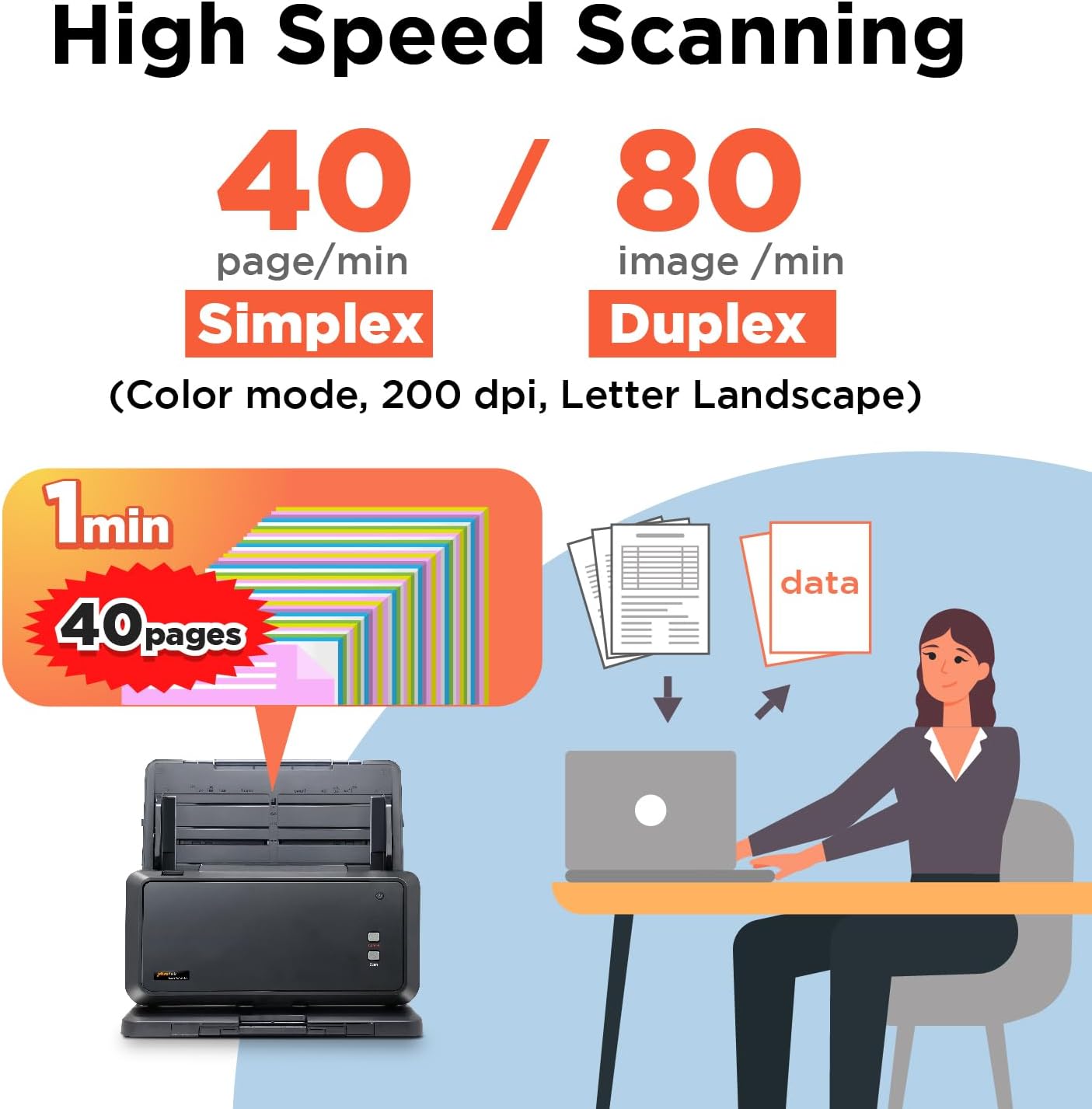
Scan Batch of Files 100-page, 40ppm / 80ipm (Color mode, 200 dpi, A4 Landscape) Productivity Bundled software automates the file archiving process. Save settings & saving location as a shortcut Quickly save your files as one Multi-page PDF, also convert files into editable & searchable. 1D & 2D Barcode Type Built-in barcode recognition, including EAN-8/EAN-13, CODE39/93/128, QR Code, PDF-417 and more ! Plustekintegrates OCR technology that recognizes the text in your documents and generate editable files automatically after scanning. Apart from the great performance of document digitization, S30 iscapable of convert files from paper-based into Excel, Word or searchable PDF format. If you need help with any issue or question, click the chat windows at the bottom right corner to contact our engineer. You can leave your contact information & question if we're not online. We also provide tips & tricks to maximize S30 utilization. What is the acceptable paper size of S30? The acceptable paper size is up to 11.69 x 200 " Can I scan & save a different batch of documents in one PDF file? Yes. How can I install S30 driver & software without CD-ROM? Please download installation package from our official website. Can I remove blank sheet when I scan a batch of double-sided documents? Yes. this feature will be enabled default. If you accidently unable this function, please right click the scan profile >>Scan >> Select "Remove Blank Page" on the right hand side. Where I can find help for Plustek SmartOffice S30? If you need help with any issue or question, click the chat windows at the bottom right corner to contact our engineer. SmartOffice S30 SmartOffice PS3140U Plustek PSD300 Plus SmartOffice PS188 SmartOffice PL4080 SmartOffice PS186 MobileOffice AD480
고객 리뷰
4.00

(100 점수)

5
10
4
10
3
13
2
6
1
61
댓글 취소
댓글을 남겨주세요

16 논평

5.0 out of 5 stars Excellent Customer Service
2025-12-27    -An engineer

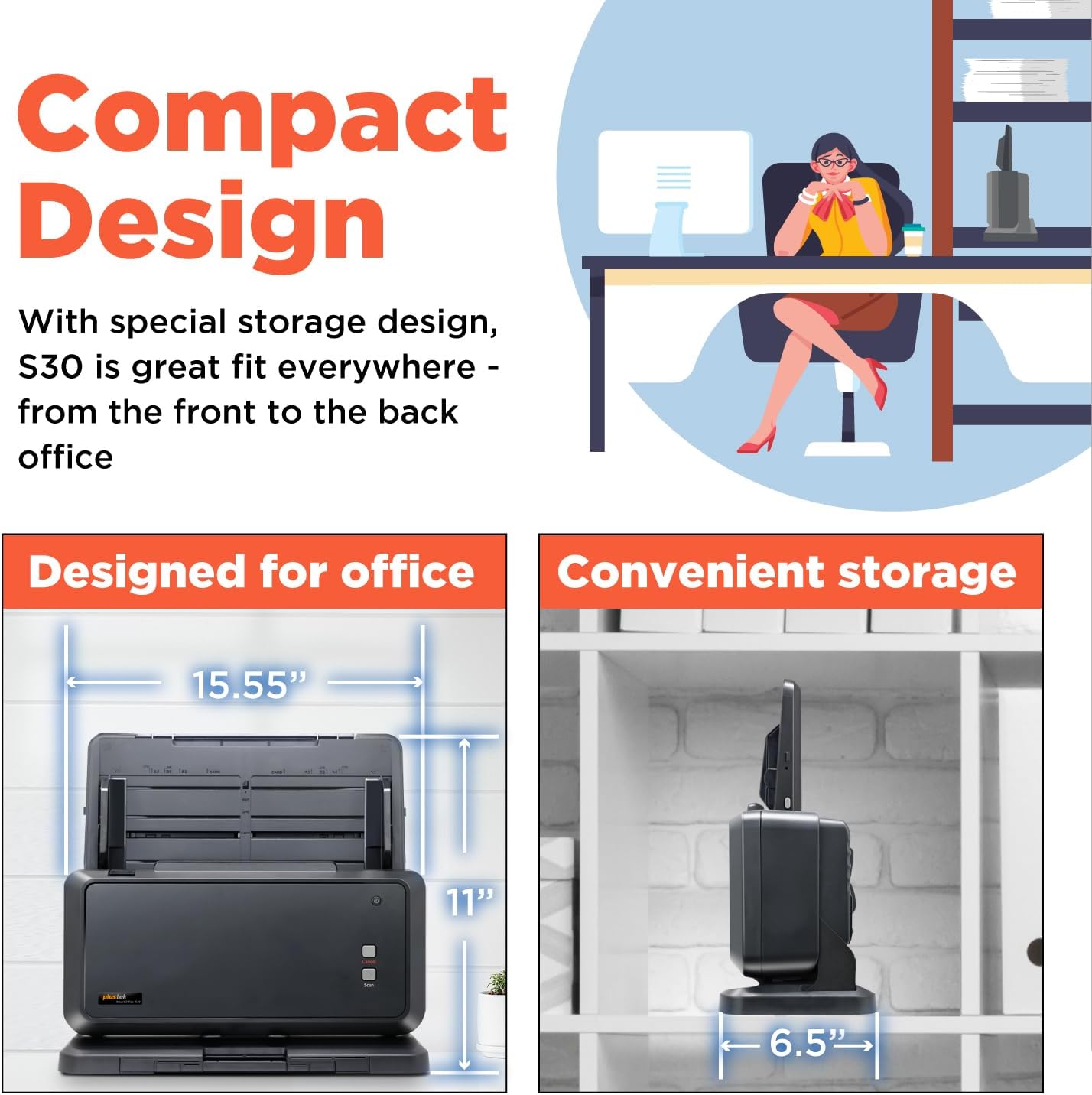
I unboxed the scanner and the connection to my computer was straightforward. Physically setting up the scanner involved the removal of a shipping card and snaping in a feed tray. Easy Peasy. I had some trouble with the setup, which required a visit to their website, but a chat with Andy resolved all my issues and the scanner is now working fine. The scanner is quick, accurate and one touch. My last scanner was a Xerox flatbed with ADF that could only feed a width of 8.5 inches and this one can run 11 inches, which means I can now scan 11x17 inch documents whereas the last one could not: a feature very nice for an engineering office. Moreover, the scanner's footprint is small enough that it fits nicely in the cabinet space occupied by my last scanner, which is unusual for a "large" format scanner. I've just put it in service, so I can't comment on durability, but as of today I would gladly purchase this scanner again.

Now that I have made 14,550 scans according to the counter, I think I can give a decent review. I was looking for a scanner capable of doing wider than 8.5", and this model was priced within my range. I will be comparing it with a Brother MFC-L8900CDW printer/scanner, as that is what I was using before getting this Plustek Smartoffice S30. My main project is to digitize my library, with some personal photos as the next biggest project. I have scanned a few office documentsOn the positive side: this model was easy to install and had zero problems with connecting to my Microsoft Surface Pro 7+. It also instantly worked with ABBYY 15 that I am using for digitizing my library. However, for the best performance in ABBYY you will need to use the scanner interface option rather than the ABBYY interface option to get more options.Speed is great, it will zip through documents quickly when used at the 200 or 300 dpi rate, but of course at 600dpi it takes more time.Now for some reasons why this did not get 5 stars:Build quality is on the weak side at some points. When I first spread the input document holder sliders, something sounded like stripping gears and one side obviously was out of kelter with the other. With a little pressure I pushed it back into place, again with the sound of stripping gears. This occurred several times before I took the cover off the back and set them where they should be and tightened the screw. I also learned that it was partially my fault: when you spread them you need to push at the right spots and they work fine. However, I would think this could be improved. Since I have learned of this "weakness" and acted accordingly I have not had them slip out of place any more.Next is the automatic sleep mode: a pesky notice shows up every time it goes into sleep mode. Then, instead of waking up automatically when needed, you have to manually push one of the buttons on the machine to awaken it. This seems like it could be updated to be like most of my other peripherals that go to sleep but wake up automatically when needed. If the "gone to sleep" notice is activated when the computer is in sleep mode itself, it is harder to awaken the computer, as it seems to interfere somehow.Color: I would probably give this less than 4 stars, although I have learned that there are controls in the dialog that can tweak things. Compared to the Brother, it is definitely the loser.Page pickup: Here the Plustek S30 outdoes the Brother, but the Plustek still seems to jam more than it should (but I cannot compare it with the multi-thousand dollar models to see if they can do better!). On some of my books it ran all pages (up to 800 pages in a single book!) through without missing a single page, while for about 10% I had to fight all the way through (probably due to moisture in the book making the pages stiffer and somewhat sticky-together). On another 10-20% there have been the occasional pages passing through together. I have found that if the paper input tray is filled to max things tend to go awry faster than if it is only loaded about half full. I don't know why ...On my photographs, the Plustek S30 did a wonderful job of running through them without missing any, but the issue that I did not like is that the color quality was not what I desired. But I will add that there are adjustments in the scan dialog that perhaps with some patience could be tweaked to make things better. The manuals do not seem to go in depth about this, at least what I saw, but maybe I missed something.For the few office documents that I scanned, the SCAN button worked very well to run through them and output a decent pdf without any effort other than loading the papers and touching the button. For this type of paper (newer, not like some of my old books) you can expect very few missed pages. The dialog can be used to make other presets. The negative about this dialog is that it cannot be resized, and it on the tiny side.So, my overall opinion of this model is that it could use some improvements, but for the price range it is probably a good option, in fact, about the only option for page sizes larger than 8.5". I scanned some large historical atlases with large pages and they scanned well and easily. If you are needing a wide scanner that will not be a "production" scanner, this is probably a good choice. If you need something for high-use, serious production you may want to consider digging deeper into your wallet and checking out models that cost double and more.Overall I am happy; maybe some of my complaints can be solved with software updates, although I do not know if that is part of the company's plans.

5.0 out of 5 stars Plustek S30 Scanner
2026-01-17    -White Wolf

Early comment. This is a true affordable scanner for regular size paper and of critical need, ledger size documents. Have about 3,000 scans in 3 days on it so far. Scans fast and accurate. Pages which are stapled together need to be physically separated after taking out staples. If you don't, multiple pages will run thru. Upside down seems to work. Somehow defaults to MS Edge PDF. Need to figure that out to get it to save directly to Adobe PDF. Tech support at Plustek (Nathan) was excellent. Answered questions which weren't readily apparent or identifiable in owners manual, i.e., "long paper", "continuous scan", etc. Nathan is a credit to Plustek as he knows the product and how to identify answers. Am sufficiently pleased with this unit that I may end up buying a second unit to speed up the scanning process in order to trash paper files in way too many roach and ant infested business file boxes.

3.0 out of 5 stars Bien
2026-01-21    -Pablo Tchekmedyian

En general bien, pero no capta bien el tamaño de las páginas donde la foto es la mayor parte de la misma

5.0 out of 5 stars Use this everyday at work
2025-12-23    -COLLINS A.

Got this for a special project initially but it's so good it stayed on my desk and I use it everyday at work.

5.0 out of 5 stars Excellent Customer Service
2026-01-26    -An engineer

I unboxed the scanner and the connection to my computer was straightforward. Physically setting up the scanner involved the removal of a shipping card and snaping in a feed tray. Easy Peasy. I had some trouble with the setup, which required a visit to their website, but a chat with Andy resolved all my issues and the scanner is now working fine. The scanner is quick, accurate and one touch. My last scanner was a Xerox flatbed with ADF that could only feed a width of 8.5 inches and this one can run 11 inches, which means I can now scan 11x17 inch documents whereas the last one could not: a feature very nice for an engineering office. Moreover, the scanner's footprint is small enough that it fits nicely in the cabinet space occupied by my last scanner, which is unusual for a "large" format scanner. I've just put it in service, so I can't comment on durability, but as of today I would gladly purchase this scanner again.

5.0 out of 5 stars Good value. Good results
2026-03-07    -Solar Tech

This thing is worth every penny if you are scanning a lot of documents wider than Letter size (wider than 8-1/2 inches). The ADF is a lifesaver. The pickup rollers are dependable and the scanning cameras yield good results. Download the latest drivers and follow the instructions.

I've had two of these now. They work fine for a while, and then just quit. No error messages, no indication, it just won't scan anymore. Really angry. Another $500 flushed down the toilet with this scanner. Don't buy.Oh, and the DocAction II driver will randomly crash. Restarting the program doesn't bring it back. Rebooting doesn't bring it back. You have to delete it and reinstall it. Execrable software.The second one I bought has now completely quit with a "Feeding paper failure!" although it fed just fine. I am so sick of this rotten product.

5.0 out of 5 stars Use this everyday at work
2026-01-21    -COLLINS A.

Got this for a special project initially but it's so good it stayed on my desk and I use it everyday at work.

Unfortunately I can’t give a review of the scanner because the software is so outdated. Do NOT buy if you have a Mac, you will only be able to use this with windows. I tried installing parallels to use Windows but the software was not recognizing the scanner still.

댓글을 남겨주세요:

댓글 제목
댓글 내용
배송 및 반품
우리가 당신을 보호하겠습니다

대부분 지역에서는 배송비를 한 번만 지불하시면 됩니다 (주문 및 배송 페이지를 확인해 주세요).

구매 후 14일 이내 무료 반품 가능 (단, 수명이 다한 제품, 맞춤 제작 상품, 마스크, 향수 및 에어로졸과 같이 위험하거나 인화성 물질이 포함된 일부 제품은 제외).

수입 관세 정보

복잡한 절차는 저희가 처리해 드리겠습니다. 카나리아 제도를 제외한 모든 EU 국가, 영국, 미국, 캐나다, 호주, 뉴질랜드, 푸에르토리코, 스위스, 싱가포르, 한국, 쿠웨이트, 멕시코, 카타르, 인도, 노르웨이, 사우디아라비아, 대만, 태국, UAE, 일본, 브라질, 맨섬, 산마리노, 콜롬비아, 칠레, 아르헨티나, 이집트, 레바논, 홍콩 특별행정구, 바레인, 터키로 배송되는 상품 가격에는 모든 수입 관세가 포함되어 있습니다. 표시된 가격이 최종 결제 금액입니다.

예상 배송 시간

특급 배송: 7-10일

해당 창고에서 배송되었습니다.

더 자세한 정보가 필요하신가요?
반품 정책
반품 정책

저희는 제품 품질에 자신 있습니다. 만약 구매하신 제품에 완전히 만족하지 못하신다면, 수령일로부터 30일 이내에 간편하게 반품하실 수 있도록 정책을 마련해 두었습니다.

간편한 교환 또는 환불
  • 다른 사이즈, 색상 또는 스타일의 상품으로 교환하거나 전액 환불받을 수 있습니다.
  • 반품되는 모든 상품은 착용하지 않은 상태여야 하며, 원래 포장 상태 그대로 모든 태그가 손상되지 않은 상태여야 합니다.
간단한 절차
  • 온라인으로 반품을 신청하거나 고객 서비스 팀에 문의하여 도움을 받으실 수 있습니다.
  • 물품을 제대로 포장해 주시고, 원래의 포장 목록도 함께 넣어주세요.
  • 반품하실 상품을 보내주실 때에는 저희가 제공해 드린 선불 배송 라벨을 사용해 주시기 바랍니다.
  • 환불 요청 접수 즉시 처리해 드리겠습니다.

반품과 관련하여 궁금한 점이나 우려 사항이 있으시면 언제든지 저희 전문 고객 서비스 팀에 문의해 주세요. 고객 만족은 저희의 최우선 목표입니다.

범주
차이
제품
모든 제품 지우기